Tuesday, February 12, 2008

Custom Validation Rules Pattern

I have not worked a lot with the Business Rule Engine (BRE) from BizTalk, but today I had to show a customer how it worked. I demoed a BRE solution, where a rule was applied to message taken by an sample orchestration (see picture below, click to enlarge).


Then customer asked if BRE could be used to validate messages received from a third party by applying rules. I said that it was possible, but validation could also take place for instance in pipeline (schema validation). From that point we had a discussion how to implement validation of messages provided by third parties. In the end we came figured out the following pattern, implemented as a validation kind of orchestration (see picture below, click to enlarge).


Message from a random third party is received. A new message with a similar schema is created. Both messages are presented to a call rules shape, where a policy will be applied. This policy contain rules like picture below, click to enlarge.


This concept delivers a way to apply custom validation rules to message provided. The message without error could be processed by for instance another orchestration or application. Wrong original messages can be send elsewhere together with message containing the error’s. Messages could be corrected accordingly to be presented again to validation orchestration in this case. This very conceptual and likely will not be implemented at all or there is a better way easier, maintainable way of validating messages from third parties. I just like to share this pattern.


If you like to know more just give a shout.


Technorati:

Monday, February 11, 2008

Upgrading BizTalk Server 2006 to R2

Today I upgraded a BizTalk Server 2006 Development Machine to BizTalk Server R2 for one of my customers. How one can do upgrade this upgrade? Well download installation and upgrade guides from Microsoft for starters. Then gather information about your system. System BizTalk Server 2006 Enterprise Edition is running on is Windows 2003 Server R2 standard edition with SP2, Intel Xeon 1.80 Ghz, 2.00 Gb RAM (Virtualized VMWare). Everything is configured from SSO to BAM Portal. In documentation provided by Microsoft one can find how to upgrade from and to which edition of BizTalk Server 2006 R2. Upgrade from Enterprise BizTalk Server 2006 Edition to BizTalk Server 2006 R2 Developer Edition is possible even though not supported!

First thing to do is stop all host instances and following services: BizTalk Base EDI Service, Rule Engine Update Service, and World Wide Web Publishing Service. Next backup all databases, here is the complete list:

SQL Server databases: master, MSDB
BizTalk Server databases: BAMArchive, BAMPrimaryImport, BAMStarSchema, BizTalkDTADb, BizTalkEDIDb, BizTalkHwsDb, BizTalkMgmtDb, BizTalkMsgBoxDb, BizTalkRuleEngineDb, TPM
SQL Server Analysis Services databases: BizTalkAnalysisDb, BAMAnalysis

After this the upgrade can start.


One can check version of BizTalk installed through this query:

SELECT * FROM BizTalkDBVersion

Or

HKEY_LOCAL_MACHINE\SOFTWARE\Microsoft\BizTalk Server\3.0\ProductEdition

I queried the BizTalk Management Database and had the following results:

DatabaseMajor, DatabaseMinor, DatabaseBuildNumber, DatabaseRevision, ProductMajor, ProductMinor, ProductBuildNumber, ProductRevision, ProductLanguage, Description

First Record (old installation): 3.5.0.0.3.5.1602.0.1033.RTM
Second Record (upgrade): 3.6.1.0.3.6.1404.0.1033.BizTalk Server 2006

After upgrade I ran Microsoft Update and I had to install SP1 for .NET 2.0 and 3.0 Framework. Last thing I am going to do now is verify if all my solutions still work.

Technorati:

Friday, February 08, 2008

Mass Copy Functiod Challenge

Today my BizTalk buddy Wouter Crooy had a problem with mass copy functiod he used inside his orchestration with a certain mapping. His mapping worked on development machine and development server, but failed to do so in test environment. Development and test were not exactly to same (it missed some patches for msxml and so on). He made an effort to get them equal, but still it did not work. So it became finding a needle in a haystack to find out what the exact problem was since he could not get it working. So what now? I suggested to use inline script instead of mass copy to achieve to same manner of mapping (he wanted to mass copy a any element).

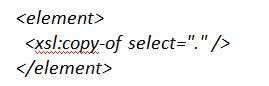
One can use the Mass Copy functoid () to recursively copy all data in an input instance message, to arbitrary depth, that corresponds to a specified node in the source schema to the position in an output instance message that is specified by the output link. One can also use inline xslt like in case you like to mimic mass copy for any element.


or if you do know what you like to copy (custom)


The latter one creates more work, but gives more flexibility what you do or do not want to copy inside an element. There is another post around mass copy or not that has been posted two month's back you can check also.

Technorati:

Monday, February 04, 2008

Experimenting with BizTalk and WCF: Operation Patterns Part I


Last week Richard Seroter wrote an article for TopXML.com to provide depth on BizTalk and WCF integration. This article explains various operation patterns when BizTalk consumes a WCF service. He touches subjects like complex vs. simple types, one way vs. two way operations, (custom) fault contracts, and using the WCF-WSHttp and WCF-WSCustom BizTalk adapters. So I read the article and tried his scenario out.

Setup

Before I could do that I had to set a new virtual machine. I created a new virtual machine with Windows 2003 Server R2 SP2; 16 Gb Hard disk space, 1024 Mb RAM, uses dual core processor from host (my laptop). Updated the server with server update. Then I added a couple of server roles to the server:

* Application Server Options with Frontpage Server Extensions and Enable ASP.NET both checked. And then IIS, COM+ remote transactions, DTC, Frontpage Server Extensions, Indexing and ASP.NET. be sure you have capture or mounted iso voor Windows 2003 Server R2 CD1 or DVD.

* SharePoint Services, and nag screen that it has been detected that your default virtual serveris running Frontpage 2002 Server Extensions. To continue set and upgrade your default virtual server later, click OK. That what I did. If iso Windows 2003 Server are CD's change to CD2. SharePoint Services 2.0 are installed. And a MS SQL Desktop Engine is installed too.

IIS as prerequisite for SharePoint services. In this case I want to check integration with SharePoint services 2.0 with R2 and with SharePoint services 3.0 later on.

I then did some defragmentation before I started installing SQL Server 2005 enterprise edition and VS 2005 professional. SQL Server starts with some prerequisites like .NET Framework 2.0, SQL native client and 2005 Setup Support Files. Next I checked SQL Server Database Services, Reporting, Notification and Integration Services together with workstation components, books online and development tools. I choose default instance next. next I choose built-in System account for SQL Server Agent, Reporting Services and SQL Browser. Windows Authentication Mode; Default collations. Install...


Test installation by running SQL Server. Turns out ok and some defragmentation again to keep things smooth. So now I have got my database, next the development environment. Custom installation, where I choose to install C#, .NET SDK, redistributed applications and that's it. So installation continues with install of Microsoft Document Explorer 2005, MS VS 2005, .NET Compact Framework 1.0 SP3, .NET Compact Framework 2.0, j# redistributable, SQL Server 2005 Mobile Edition and Microsoft Device Emulator version 1.0 (a lot I do not need but get anyway). I leave MSDN library out as takes a lot of space and I use Internet if any strange thing occurs or MSDN online. Oke finally check for updates and then are we ready. It did had to get some stuff SQL Server, Office 2003 SP3 update for some reason, MSXML 6.0 RTM Security update, Visual Studio SP1 (which failed to install:Microsoft Visual Studio 2005 Professional Edition - ENU -- Error 1718.File C:\WINDOWS\Installer\7d32ef.msp did not pass the digital signature check. or C:\WINDOWS\Installer\7d32ef.msp is not permitted due to an error in software restriction policy processing. The object cannot be trusted and location of log file 23 Mb is big so happy hunting why the heck it did not install), Security update IE 7, Security update xml core services and SP1 for it, and update CAPICOM. Again I did a defragmentation, after this installation and updates.


Installation of BizTalk Server 2006 R2; Started installation and choose the following options:

* Documentation
* Server Runtime with BizTalk EDI/AS2 Runtime and WCF
* Portal Components with Business Activity Services and Monitoring
* Administration Tools (WCF)
* Additional Software like SSO, BRE and BAM

Get redistributable from the web installing .NET 3.0 Framework, SQL XML 3.0 SP3, MS Office Web Components, ADO MD.NET 8.0 with patch, ADO MD.NET 9.0, Setup runtime, SSO, SSO Administration and MS Primary Interoperability Assemblies 2005. After installation of components and redistributable came configuration of BizTalk Server. I started configuration (custom) with administration credentials of my virtual machine. Nag screen about having too much privileges, but this development/Research so what the heck.

Configuration BizTalk Server R2

First configuration is SSO, so I checked enable SSO on this computer and the rest as is. Other thing one has to do is backup secret password. And then I applied configuration of SSO and MSMQT. Under the hoods WMI scripts are being fired to perform the configuration. Next group; where I enabled BizTalk Server Group on this computer. I then I found out I had to install SQL Server 2005 SP2. So there I had to break off the configuration. So then I downloaded and installed SQL Server SP2 and rebooted in the end. I tried to configure BizTalk Server Group again; it went successful and Management, tracing and MessageBox databases were created. Then I configured the BizTalk Server Runtime, where I had to add credentials for the host instance account and isolated host instance account. This account is the same as I log in as administrator, so there the nag screens came up again for having too much privileges. next thing I configured was the VRE, where a rules engine database will created and rules engine service will add to windows services with an account (yes same administrator account). That went smoothly as well. I then started configuration of BAM Tools, where two more databases are being created BAM Primary Import Database and BAM Archive Database. Also a new service BAM Notification Service was added to Windows Services with again administrator account having too much privileges (nag screen again). After configuration BAM tools came configuration BAM Portal by enabling it and add account for web service user and application pool account. I used administrator account again. I choose BAM Portal Web Site: Default Website. This went ok as well. I then went for configuration of BizTalk EDI/AS2 Runtime. I check checkbox enable BizTalk EDI/AS2 Runtime on his computer. This succeeded. HWS will not be configured since this is in my view rudimentary, because in next version WF will used for system/human workflow. Windows Workflow Foundation is now available a far better alternative than HWS or one can take other products for workflow like K2.NET. Last two things to configure are SharePoint Adapter and BAS. SharePoint Adapter can only be configured when a virtual server is configured; so this has to be done first. Secondly BAS services can only be configured if SharePoint Adapter is. I went to Microsoft SharePoint Administrator and there I extended SharePoint Central Administration. I also noted Default Website was running under .NET framework 1.1. so this has to be upgraded to 2.0 ("%SystemRoot%\Microsoft.NET\Framework\v2.0.50727\aspnet_regiis.exe" -i).

I also had to get rid of frontpage 2002 and then I could extend it. And yes I could then configure the SharePoint Adapter. I could then also configure BAS with accounts creating by using administrator account again. Then I am all set, everything configured except HWS.

Conclusion

I must say setting it up did not take as long as on my old laptop. This new one I have now (see previous post) is twice as fast. This complete setup with al steps described above and updates only took me 4 hours max. Virtualization, good hardware (laptop), high-speed internet and MSDN subscription will bring you up to speed to try stuff out in just one day. Trying out part is WCF integration with BizTalk Server R2. Where I have reach middle of the article now with experimenting after another 4 hours. So in day's work nowadays one setup an environment and start experimenting. Next post I will delve into WCF example of Richard and how I did it to get similar experience as he explains it. After that I will experiment with SharePoint adapter and on and I will share that too.

Technorati: