Wednesday, January 30, 2013

BizTalk Community Series: Introducing Torben Chrona Christiansen

The year 2013 promises to be a great year for us BizTalk professionals. BizTalk Server 2013 will be released in a few months, the beta is currently available on-premise and in Windows Azure. A few events have taken place already this month like the BizTalk Summits in London, Amsterdam and Stockholm. There will be more events coming this year. A lot of community involvement in 2013.

Today’s story will be on Torben Chrona Christiansen, a fellow BizTalk professional with a passion for BizTalk Server. Torben lives with his family (a wife, a son at the age of 3 and a son almost 1 year old) in Blovstroed about half an hour drive north of Copenhagen. He has a great interest in photography, loves to take pictures and runs a website about camera gear.

Torben likes to run when he has time for it and each autumn he tries to participate in the Eremitagelobet. He is also a big fan of the soccer team FC Copenhagen (FCK) and if he has the chance he will go to their home games at their stadium in Copenhagen.

Torben works as a consultant at CGI (former Logica) his whole professional career (16 years). During that time he has worked on many different projects. His first job was doing some Excel automation back in 1997.

“Since that time I have had experience with most types of application development from Office development, to multi-layered web and windows application, to business intelligence and enterprise application integration. Today I am an architect, where my main focus is the integration and enterprise architecture, where I advise companies in Denmark with some degree of development of the solutions too.  My current projects include a large BizTalk integration project with Salesforce to various other systems and the other major project has a focus on integration strategy with Windows Communication Foundation, Windows Workflow Foundation and BizTalk Server 2010 as some of the core technologies.”

Torbens BizTalk expertise covers all aspects of a BizTalk solution. He sometimes does the architecture for a solution, is involved in the development of the solution or helps with the administration from the setup to the daily maintenance of already deployed solutions.

“My first BizTalk solution was based on the BizTalk Server 2004 and the base EDI adapter. Since then I have been around a great deal of the technologies that are available in the product. I like working with the BizTalk Server product, but at the same time it is a little bit sad that Microsoft has not made major investments in the product over the last couple of years.”

“There are four major things I would like see in the product. One is to replace the orchestrations with workflow foundation. The develop experience and extension possibility in Workflow Foundation is 10 times better than offered through BizTalk orchestrations. Two is the low latency option in BizTalk. Three is some better adapters for standard Microsoft products like Dynamics CRM, SQL Server, Dynamics AX and more (working with third party products like Scribe and TimeXtender I know it is possible). The fourth and final thing is the pricing. It is just too expensive to get started for a lot of companies.”

A final comment by Torben:

“Thank you for reading my blog. Share, comment and connect that is how we get better as a community. Remember to enjoy your life with the things that make you happy.”

Thanks Torben for your time and contributions to the BizTalk community (MSDN and blog).

Cheers,

Steef-Jan

Monday, January 21, 2013

BizTalk Server 2013: New Adapters Series: WCF-NetTcpRelay

This is the second post on new adapters that will be shipped with BizTalk Server 2013. The post is based on BizTalk Server 2013 Beta. In this post I like to demonstrate the WCF-NetTcpRelay adapter.

The WCF-NetTcpRelay adapter can be used with BizTalk to send and receive messages from the Service Bus relay endpoints using the NetTcpRelayBinding. When configuring for instance a request response receive port, you can enable a receive location using the NetTcpRelayBinding. The receive location with contains an address using the “sb” URI scheme. Through the receive location the endpoint (address) will be registered in the Windows Azure Service Bus.

The URI consists of the namespace available in Windows Azure Portal Service Bus. Windows Azure is multitenant and therefore to manage the service bus capacities like relay has to be done through a unique namespace (see Create Namespace section of How to Use the Service Bus Relay Service).

image


The following scenario will describe a way to send messages to a Service Bus relay endpoint configured through WCF-NetTcpRelay adapter in BizTalk Server 2013. A message from a client application will be send through the relay in the Windows Azure Service Bus to BizTalk Server. The received message will be routed to an orchestration that will process the message. The response will be send back to the client. Below you will find a diagram that shows the flow of a message from a client (Service Bus Explorer) that will send a message to endpoint registered in Windows Azure Service Bus, which will be relayed through to BizTalk.

image

BizTalk Server has an endpoint registered in the Windows Azure Service Bus through a receive location that is configured with the WCF-NetTcpRelay. A receive location in BizTalk Server 2013 can be configured with the WCF-NetTcpRelay Adapter using the "sb" URI scheme. The URI will be used to register the endpoint on the Windows Azure Service Bus. This can be specified through the General tab of WCF-NetTcpRelay Transport properties.  

With the Binding tab you can configure the time-out and encoding-related properties. Depending on your requirements you can specify different values than the default. For this scenario the default values are used. In the Security tab you can specify security capabilities of the WCF-NetTcpRelay receive location. Here you can specify the security mode, transport security, client security, discovery mode and access control service.

image

The transport mode will be Transport, the security is provided through using TLS over TCP or SPNego. Transport security setting is None in this scenario. This means that messages are not signed or encrypted. In case you want to prevent tampering with messages you can sign the message and/or encrypted in case you require date-level privacy; you then have to choose Sign or SignAndEncrypt and specify the message security/service certificate.

By checking the “Enable service discovery” checkbox you can specify whether the behavior of the service is published in the Service Registry. By checking this checkbox the Display name text box and Discovery mode combo box will be enabled. In the text box you can specify the name with which the service is published to the Service Registry. The Discovery mode can be private or public. Public means publishing in the Service Registry, while private means this will not happen.

Finally with the Access control service you can specify the credentials to be used for authorization with the Service Bus in Access control service in case you have specified that the Relay Client authentication type is RelayAccessToken. If that is the case then you will have to specify through Access control service (Edit… button) the Issuer name and key.

image

The final tab called Messages enables you to specify the data selection for the SOAP Body element. In this scenario all settings are as is (default).

Enabling the receive location will result in registration of receive location as an endpoint on Windows Azure Service Bus. This will be visible in Windows Azure Portal under the Service Bus your namespace within the relays tab.

image

If you disable the receive location and go back to relay tab in Windows Azure Portal and refresh the portal then the endpoint will be disappeared.

image

The discovery mode has been set to public for the endpoint this means that is also visible through the url https://<yournamespace>.servicebus.windows.net/.

image

With the relay present in the Service Bus you can send messages to it. Communication with the endpoint in this scenario will be two-way. Therefore message exchange will be request-reply. A message will be send through the Service Bus Explorer tool to the relay endpoint.

This tool created by Paolo Salvatori allows users to connect to a Service Bus namespace and administer messaging entities in an easy manner. It is a great tool to test messaging with for instance relays. You start the explorer, enter the credentials for the namespace in Windows Azure Service Bus you want to connect to, connect and you can manage your namespace.

image

In this scenario a message will be send to the relay endpoint. The message will contain two numbers (a en b) that will be added together by an orchestration tied to the relay endpoint (receive location) the result be send back to client (Service Bus Explorer). In the pane next to outer left pane you paste the message (payload). This is an instance of the expected message type (schema). In the sender tab you select the appropiate binding e.g. NetTcpRelayBinding.

image

Besides specifying the binding you can configure the number of messages, enable logging and statistics. In this scenario the logging was enabled to see the result of test. The test can be initiated by clicking start.

image

To test your endpoint configured through WCF-NetTcpRelay can easily be tested using the Service Bus Explorer. This will save you time in writing a test client.

This was the second of the series on the new adapters that will be available with the upcoming releases of BizTalk Server 2013. The scenario above was created on a BizTalk Server 2013 Beta Virtual Machine I created on-premise with Windows Server 2008 R2, Visual Studio 2012 and SQL Server 2012. You can download the BizTalk solution I created for the calculation to relay through the MSDN code gallery. In the next post I will discuss the SB-Messaging.

Cheers,

Steef-Jan

Saturday, January 19, 2013

BizTalk Summit London 2013 – The experience

The BizTalk Summit 2013 in London was a huge success. Saravana Kumar from BizTalk360 did an outstanding job organizing this event with Microsoft. Over a 140 attendees,  more than 70 different companies from 15 different countries (UK, Ireland, USA, Denmark, Netherlands, Austria, Belgium, Sweden, Italy, Spain, Switzerland, Germany, France, Norway, India). Including the speakers there were 10 Microsoft Integration MVPs present. On the Q&A panel there was Jon Fancey, Michael Stephenson and Charles Young. Stephen W. Thomas flew over from the US to attend the event.

My session was straight after the Keynote by Guru Venkataraman/Ravi Krishnaswamy from Microsoft Product Group. I was given the opportunity to co-present with Guru in Almere (Avande) during the special BizTalk User Group event. In London I did a session on the new cloud related adapters that’s going to ship with BizTalk Server 2013.


BizTalk 2013 will feature some new adapters, the WCF-BasicHttpRelay, WCF-NetTcpRelay, SB-Messaging and WCF-WebHttp. The first three have capabilities to configure connectivity with the Windows Azure Service Bus. This will enable you to create solutions that will enable communication between systems and applications across network boundaries. The WCF-WebHttp adapter will bring Rest Support for BizTalk. In my session I demonstrated the characteristics of each adapter with a demo.

My session was followed by Saravana. He talked about the monitoring and management of BizTalk Server using BizTalk360. Imaging that is already the FIFTH release of the product with the next version under way. That’s just amazing release cycle in just two years!

Lunch was around noon and followed by a Q&A panel with Jon Fancey, Michael Stephenson, Charles Young joined by Microsoft Kent Brown and Ravi Krishnaswamy. No holds barred as any question was allowed to be asked by the attendees. A lot of questions were targeted towards Microsoft. Ravi and Kent did an excellent job answering them. After Q&A Sandro Pereira took the stage with his session on BizTalk Azure Service EAI/EDI capabilities containing some deep technical demos. The session after Sandro was followed by two more sessions. The architect assessment by Nino Crudele. He did the most hilarious session of the day. With his Italian accent, jokes and funny customer scenario’s he had the room laughing to tears.


The last session was done by the new Microsoft Integration MVP Tord G. Nordahl. During his session he discussed the platform improvements in Windows Server 2012 and SQL server 2012 that BizTalk people need to be aware of.

It was a great experience and honor to share the stage with my fellow speakers (#BizTalkCrew), fellow Microsoft Integration MVP’s and Microsoft Product Group. As speakers we have done a good job providing sessions on different topics around BizTalk Server 2013, Azure and BizTalk360.


Thanks Saravana Kumar, Microsoft and all the attendees for making this event something to remember by.

I had a great time. I enjoyed the discussions with the attendees and meeting the BizTalk community. It was good to meet Naushad Alam, Stuart Brierly, Charlie Mott and Colin Meade in person.

The next event done by us will be in Portugal in March 2013. See you there!

Cheers,

Steef-Jan

Thursday, January 10, 2013

BizTalk Community Series: Introducing Mark Brimble

This year I like to continue with the BizTalk Community Series. In January 2012 I started with Tord G. Nordahl, who recently was awarded Microsoft Integration MVP. He was very committed to the BizTalk community for quite a while and proven to be a great contributor to the community. I ended with 25th story on my colleague Sander Nefs.

The story today will be on Mark Brimble a Principle Integration Architect since 2007 for Datacom in Auckland, New Zealand (NZ). This company has the largest group of BizTalk professionals in NZ (24 people). He spends most of his spare time with his wife Margaret and daughter Rebecca. Rebecca is a bassoon player and Mark attends her concerts when he can. He also enjoys travelling with his wife, who speaks at many overseas conferences. 

Mark also enjoys playing chess and likes to go fishing. He plays tennis and golf when time allows. When it comes to team sports Mark supports the All Blacks rugby team and any team playing Australia.

Mark’s outline of his career:

“Before BizTalk I was a support analyst for eGate which is now JavaCaps (in another life I was a chemist but that is another story). I was introduced to BizTalk 2002 in 2003 by Emil Velinov and Thiago Almeida. I decided then that BizTalk was my future. When Thiago left that company I had to assume not only an administrator but also a developer role. After migration from to BizTalk 2004 and then to BizTalk 2006 I wanted to move to a role where I was only responsible for development and I moved to Datacom as BizTalk developer. After a while at Datacom I was pleased to renew my relationship with Thiago when he also joined. At that time all the buzz was the new WCF adapters in BizTalk 2006R2 and look back now at all the fun we had learning how to use them. Since BizTalk 2009 I have spent more time designing integration solutions, pre-sales presentations and mentoring BizTalk developers. We have some promising BizTalk developers so watch out for them because I think one of them might be Datacom’s next MVP.”

Mark has always been a fan of the BizTalk development experience and the administration console since he first saw it in BizTalk 2004. He likes the way you can build/configure a simple interface very quickly and the monitoring is always there. The most challenging thing Mark has ever had to do was write a WCF socket adapter to connect to vending machines. The project that this was for won an award.

Mark started his blog as a bit of a dare from one of his colleagues. He tried to write something every month and it is a record of his integration projects. Mark also feels it is a way of giving a little bit back to the community that has helped him so much in the past.

“If one person is helped by my blog then it is all worthwhile.”

I could not agree more. Thank you Mark for your time and contributions to the community.

Cheers,

Steef-Jan

Friday, January 04, 2013

Speaking about BizTalk in London and Amsterdam

The year 2013 will start with two events where I will be speaking. First, on January 16nd I’ll be in London during the BizTalk Summit 2013 hosted by Microsoft UK in their headquarters. It is organized by fellow Microsoft Integration MVP Saravana Kumar (BizTalk360) and Microsoft UK. Saravana and I will be joined on stage by Microsoft Integration MVP’s Tord Nordahl, Sandro Pereira and Nino Crudele. My session will be on the new adapters in BizTalk Server 2013. In this session I will focus on adapters that can be used for integration with cloud services and applications. These adapters are the WCF-BasicHttpRelay, WCF-NetTcpRelay, SB-Messaging and WCF-HttpWeb. In this session there will be 5 demo’s on to how to use these adapters.

Next on the 22nd of January I will be at an event hosted by middleware service provider ESTREME. There will be joined on stage by fellow Microsoft Integration MVP Saravana Kumar, Richard Seroter, who’s touring the Netherlands and Sweden, and Derk Shutte. I will be presenting on BizTalk Best Practices. It will be interesting to talk about best practices from an operational and development view. During my talk I hope on some good discussion with the audience around the best practices for BizTalk.

Both events will be great fun and I like to thank Tim Jonker, Bert van Ark, and Mark van der Harst from ESTREME for organizing the event, Mikael Hakansson for getting Richard to Europe and Saravana for organizing the event in London!


Thursday, January 03, 2013

BizTalk Server 2013: New Adapters Series: WCF-BasicHttpRelay

In next couple of weeks I like to do a series of blog posts on the new adapters provided in the upcoming release of BizTalk Server 2013. In this post I like to demonstrate the WCF-BasicHttpRelay adapter.

The WCF-BasicHttpRelay adapter can be used with BizTalk to send and receive messages from the Service Bus relay endpoints using the BasicHttpRelayBinding. This is a binding that BizTalk can use to configure endpoints which can communicate with ASMX-based Web services and other services that conform to the WS-I Basic Profile 1.1. The BasicHttpRelayBinding is derived from the standard BasicHttpBinding. However, the key difference between the two is that the BasicHttpRelayBinding can create publicly reachable and, if required, publicly discoverable HTTP listener endpoint listening on the Windows Azure Service Bus, while the BasicHttpBinding listens through the standard HTTP.sys listener on the local Windows computer.

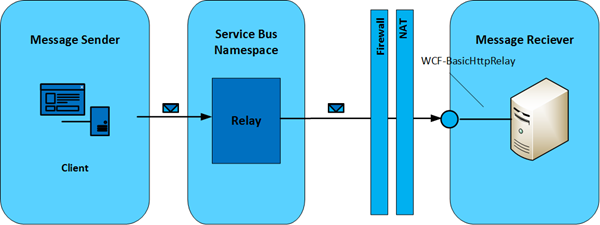
The following scenario will describe a way to send messages to a Service Bus relay endpoint configured through WCF-BasicHttpRelay adapter in BizTalk Server 2013. A message from a client application will be send through the relay in the Windows Azure Service Bus to BizTalk Server. Below you will find a diagram that shows the flow of a message from a client (a feedback application) that will send a message to endpoint registered in Windows Azure Service Bus, which will be relayed through to BizTalk.

image

BizTalk Server has an endpoint registered in the Windows Azure Service Bus through a receive location that is configured with the WCF-BasicHttpRelay adapter. A receive location in BizTalk Server 2013 can be configured with the WCF-BasicHttpRelay Adapter using the "http" or "https" URI scheme. The URI will be used to register the endpoint on the Windows Azure Service Bus. The URI can be specified in the general tab of the WCF-BasicHttpRelay Transport properties.

image                            WCF-BasicHttpRelay Transport properties General Tab.

With the Binding tab you can configure the time-out and encoding-related properties. Depending on your requirements you can specify different values than the default. For this scenario the default values are used.

image

WCF-BasicHttpRelay Transport properties Binding Tab.
The created channel is SSL-protected if the endpoint URI scheme is “https” and configured through the security tab of WCF-BasicHttpRelay Transport properties.

image                          WCF-BasicHttpRelay Transport properties Security Tab.

When setting the Security mode to Transport or TransportWithMessageCredential the scheme will be “https”. Setting it to none the scheme will be “http”. By checking the “Enable service discovery” checkbox you can specify whether the behavior of the service is published in the Service Registry. By checking this checkbox the Display name text box and Discovery mode combo box will be enabled. In the text box you can specify the name with which the service is published to the Service Registry. The Discovery mode can be private or public. Public means publishing in the Service Registry, while private means this will not happen.

Finally with the Access control service you can specify the credentials to be used for authorization with the Service Bus in Access control service case you have specified that the Relay Client authentication type is RelayAccessToken. If that is the case then you will have to specify through Access control service (Edit… button) the Issuer name and key.

image
                              The Access control Service Dialog Box.
The final tab called Messages enables you to specify the data selection for the SOAP Body element.

image

                                WCF-BasicHttpRelay Transport properties Messages Tab.

In this scenario all settings are left default.

Enabling the receive location will result in registration of receive location as an endpoint on Windows Azure Service Bus. This will be visible in Windows Azure Portal under the Service Bus your namespace and then relays.

image

With the relay present in the Service Bus you can send messages to it. Communication with the endpoint in this scenario will be one-way. Therefore message exchange will be fire-and forget. In case the Relay client authentication type is set to none when configuring the adapter your endpoint is accessible for everyone that has knowledge of the endpoint address. With a simple HTTP post I can send an XML message to the endpoint.

image

The message ends up in BizTalk being published to the MessageBox through Receive Port having a receive location configured with WCF-BasicHttpRelay adapter. A send port will have subscription of the message, which was received through the receive port and will send the message to a file location on the BizTalk machine.

image

In case the Relay client authentication type is set to RelayAccessToken when configuring the adapter your endpoint is only accessible for those that have the key and have knowledge of the endpoint address.

image

This scenario shows how with relative ease you can configure a receive port to register an endpoint in Windows Azure Service Bus. This enables you to receive messages into BizTalk to for instance start a process or collect data. In case you register an endpoint in the Windows Azure Service Bus like this then there is an easy way to test it. You can download the Service Bus Explorer by Paolo Salvatori. This great tool enables you to connect to the service bus, browse within you namespace your queues, topics and relays (see my post on Visual Studio Service Bus Explorer versus Standalone Service Bus Explorer). It provides capabilities to test communication with the Windows Azure Service Bus. If I go to the endpoint I created and select the URI I can send a test message to it.

 image

The message will be send to BizTalk through relay in the Windows Azure Service Bus and finally end up in a folder on the BizTalk machine.
 image
 

To test your endpoint configured through WCF-BasicHttpRelay can easily be tested using the Service Bus Explorer. This will save you time in writing a test client. This was the first of the series on the new adapters that will be available with the upcoming releases of BizTalk Server 2013.

The scenario above was created on a BizTalk Server 2013 Beta Virtual Machine I created on-premise with Windows Server 2008 R2, Visual Studio 2012 and SQL Server 2012. You can download the client I created for sending messages to relay through code gallery. In the series I will discuss the WCF-NetTCPRelay in the next post followed by posts on the SB-Messaging, WCF-WebHTTP and SFTP Adapter.

Cheers, Steef-Jan

Wednesday, January 02, 2013

My year 2012 In retrospective

First of all happy new year! 

In this post I would like to summarize how my year 2012 went. For one it has been a very busy year like last year 2011. To summarize all my activity bullet wise:

During 2012 I became good friends with quite a few people. Some of them I visited their homes, wedding and companies. It is great to have Kent Weare, Randal van Splunteren, Richard Seroter, Tord G. Nordahl, Sandro Pereira, Saravana Kumar, Nino Crudele, Johan Hedberg, Mikael Hakanson, Stephen W. Thomas, and Mick Badran as a friend and fellow BizTalk now Microsoft Integration MVP to collaborate with (some of them are in the picture below).

DSCN0585

Mikael, Me, Richard, Kent, Johan, Sravana, Stephen, Tord and Mick having a drink at Earls, Bellevue.

February this year I organized a BizTalk innovation event with Saravana as one of the speakers. This turned out to be a success, which was followed up by Nino organizing one in Milan with myself, Saravana, Nino, Tord and Sandro as speakers. Again this turned out to be a successful event. In September Tord (since 1st of January 2013 also a Microsoft Integration MVP) organized a two day BizTalk Innovation event at Bouvet with the same speakers. This turned out to be a huge success.

This year in two weeks from now there will be an event with all of us speaking at the London BizTalk Summit 2013 organized by Saravana, Microsoft UK and BizTalk product group. This will be a great event for us and another possibility to speak as a group, which unofficially is named the “BizTalkCrew” (you’ll sometimes will see the hashtag BizTalkCrew in some of our tweets).

On the personal side I got interested in running and start doing so since April 2012. I have run over 200 miles so far and completed two runs (10 miles in Amsterdam, the Dam-to-Dam run and 9,5 miles in Nijmegen, Seven Hills run).

Steef

Running the Seven Hills run (Zevenheuvelen loop, Nijmegen) at 10 kilometers mark.

Besides running I dedicated most of my time with my family and friends, travelling and of course the BizTalk community. Thanks everyone for reading my blog and I will continue to share my knowledge through speaking and writing in 2013.

Cheers,

Steef-Jan