Posts

Showing posts with the label BizTalk Server 2006 R2

A flying start for BizTalkAdminsblogging.com

BizTalkadminsblogging has had a tremendous start. Within a week and a half 13 posts already and this will be number 14. An average almost two blog posts a day. This reflects the high demand for BizTalk administration related information, the need for sharing it and desire to create more exposure for this aspect of BizTalk Server. Jeroen and Joris have done an excellent job setting up this blog site, running and maintaining it. The recent posts have touched topics like PowerShell, Microsoft Operation Framework, and so on. There is also a TechNet Wiki, where some of the bloggers and others have written articles on BizTalk Administration. I , Tord G. Nordahl , Sandro Pereira , Howard S. Edidin and Microsoft have written the following articles that are related to BizTalk administration: BizTalk Server 2010 - Tools BizTalk Server: Disaster Recovery BizTalk Monitoring Tools Administering BizTalk 2010 - Roles and Responsibilities BizTalk Server 2010: MSDTC Installing Biz...

TechNet Wiki: The number of BizTalk articles is growing …

A couple of weeks ago I wrote a blog post for the Official blog of TechNet Wiki with the topic “Wiki-Ninjas on Technology: BizTalk Server” . In that blog post I wrote a story on contributions of the community and Microsoft employees for the TechNet Wiki . Mid December there were little of 40 BizTalk Wiki Articles and over a month’s time it has grown to little over 70 . That is a tremendous growth of articles (around 30 ). It show increasing popularity of the TechNet Wiki as a channel of information on Microsoft technology and products. The newly added articles on BizTalk Server have been written by myself, Tord Glad Nordahl , Sandro Pereira , Howard S. Edidin , and Mick Badran . All these articles (existing and new) are being improved every day by people mentioned here and others (Microsoft employees and the community). I expect the number will grow over time to over 100+ articles as more community members will probably join. With the wealth of information on TechNet Wiki, MSDN and...

Benchmark my VPC

Image
My colleague Gijs (BizTalk MVP) pointed me towards benchmark tool for BizTalk. This wizard checks the performance of your BizTalk Server installation using pre-existing scenarios and validates it against some known results. I thought I will give it a spin on my VPC (sandbox BizTalk 2009 environment with SQL Server 2008 Enterprise and Windows 2008 Enterprise). Installation process is describe on this blogpost . Run script: If follow up the rest of process and you have your Benchmark tool set to go. Start Wizard, give correct database name, let check prerequisites and select a scenario: In this case a Single Server Installation with orchestration with singel messagebox. Fill in details (server name, test duration), start Indigo service.   Test service: Run the test: and then finally the results as test is running: This test runned inside my VPC, with 1024 Mb memory and 1 CPU (Centrino Vpro Dual Core). Test did succeed completly: I fini...

BizTalk and MSDTC

Image
Microsoft Distributed Transaction Coordinator (MSDTC) is an important component in a BizTalk environment. Especially in multi-server environment it is mandatory and needs to setup and configured properly before one starts configuring BizTalk features like group, BRE or BAM. During configuration of these BizTalk features, databases like BizTalkMsgBoxDb, BizTalkMgmtDb, BizTalkDTADb (tracking archiving), BizTalkRuleEngineDb, or BAMPrimairyImport and other (BAMStar, ect) are created on database server. MSDTC is component inside Component Services (Windows 2003, Windows 2008). Below is a screen from DTC inside Component Services Windows Server 2008.   By right clicking Local DTC you can configure it via three tabs (Tracing, Logging, and Security). To enable MSDTC on Windows Server 2003 or 2008 you can find that on this MSDN page . Below is a screen from DTC inside Component Services Windows Server 2003. There are three tabs available and first on is Tracing (this accounts W2K...

BizTalk Hotrod 8

Image
Before end of the year a new issue of BizTalk Hotrod is made available . I happy to announce that my article around BizTalk Adapter Pack 2.0 is in this issue. Some of you know that I posted a few things around BizTalk Adapter Pack in August . This inspired me to write an article and share my experience/knowledge with fellow BizTalk professionals in the world. Information shared was a bit more than you put in a blog post. Alongside my article you will find articles about ESB Toolkit, BAM, HL7, Management with Powershell from fellow Dutch BizTalk pro Randal van Splunteren and all, Creating Custom Receive Decoder Pipeline and Business Process Automation with SharePoint and BizTalk. Enjoy reading the magazine. Technorati: BizTalk BizTalk 2006 R2 BizTalk Server 2009

Monitoring BizTalk Solutions – The Tools Part 4

Image
Monitoring Scenario In this post and the next I would like to go through a scenario to have the ability to further evaluate the three monitoring tools for BizTalk. I will use an Oracle backend (i.e. Oracle 10g Express), .NET, BizTalk and a Windows Front End application. I have an environment (VPC) that contains BizTalk Adapter Pack 2.0, Oracle Express 10g, BizTalk Server 2009 and the three monitoring tools BizMon, Minotaur and FRENDS Helium. In this scenario we will expose data inside Oracle database to an application and update this information to our liking and see to it that it will be updated in Oracle database. BizTalk (Messaging) together with Adapter Pack 2.0 (Connectivity) will be exposing the Oracle through messages, by submitting a request and receiving a response. Update to data be routed back through update request and response will be shown in front end application. Below you will find a diagram to visualize the process (scenario) just described. We will use the three mo...

Monitoring BizTalk Solutions – The Tools Part 3

Image
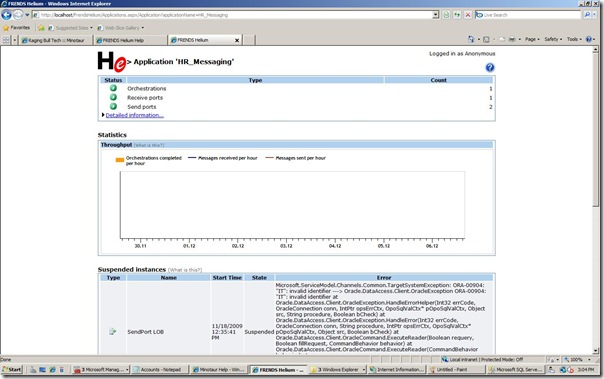
In previous posts ( part 1 , part 2 ) I mentioned three tools for monitoring BizTalk solution, BizMon, Minotaur and FRENDS Helium. In this post I want to dive into installation, configuration of FRENDS Helium . This is a web-based tool for monitoring BizTalk Server installations and provides operators a simple view to error situations occurred in BizTalk Server installation. You obtain a trail version through their website . You will be provided with license key instantly and url to download trail. Note that you have to give your details by registering yourself. If you fail to do so you will be presented by following message: License error Sorry, the license could not be verified: Loading license failed: Could not find file 'C:\Program Files\Frends Technology\FRENDS Helium\FrendsHelium.lic'. Please contact your friendly administrator, he should be able to fix the license problem. Installation on my VPC was pretty straight forward, but I did run into determining disk problem a...

Monitoring BizTalk Solutions – The Tools Part 2

Image
In previous post ( part 1 ) I mentioned three tools for monitoring BizTalk solution, BizMon, Minotaur and FRENDS Helium. In this post I want to dive into installation, configuration of Minotaur V1.04 monitoring tool. I use same environment as for BizMon tool. Minotaur is licensed per BizTalk group, so after installation you will to ask for a license key by sending an email to Registration@RagingBullTech.com with following details: SQL Server Name \ Instance Name and BizTalk Management database name. When you want to install Minotaur on Windows 2008 as in my environment it has to be done under a local administrator account. This account also needs to be member of BizTalk Administration group and in my case since I am using IIS 7.0 also member of IIS_IUSRS group. During installation three components can be installed: After features page you will be presented with the SQL Information page, the Connection String page and the Service Credentials page. For service crendentials I created...