Saturday, May 30, 2009

Harakiri on Twitter

A few months ago I killed myself (virtually) on Twitter. At least I thought I did (forgot to terminate it for real), but my account was still there and I saw that people are still following me.

deadtwitter

I now realize that it is something that cannot be ignored and a medium used by so many people outside and inside my network. I therefore start using it again and have risen from the dead (virtually). I know there is a lot of corny and silly stuff being put up there, something I did myself too towards colleagues and people I know. People can make mistakes or look things from a different viewpoint. You can follow me here: http://twitter.com/SteefJan.

happy-twitter-birds

I will seriously use from now on and explore its potential.


Technorati:


Friday, May 29, 2009

WF 4

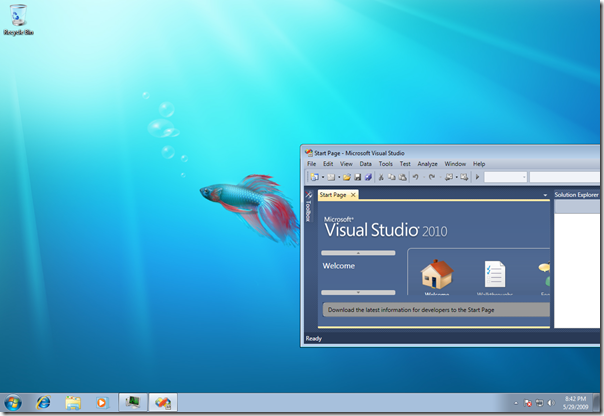
This week I attended DevDays in The Hague. The most interesting or intriguing for me was Workflow 4. Matt Milner did a preconference Wednesday and some session during the conference. He did his demos in VS2010 Beta 1, which is available right now. I downloaded beta 1 and installed in on (YES!!) Windows 7 RC on VPC (that is possible). Windows 7 is just marvelous and runs smoothly inside my VPC (It is goodbye Vista).

image

You can download his code and session material from his blog. Ok lets turn to VS2010 Beta 1 and WF 4. I am not a Workflow expert, but i did follow its evolution in 3.0 and 3.5 during conferences in Holland and abroad, like VS2007 in San Francisco (beautiful city, open, warm and liberal). I must say I was impressed at first what it could do and experimented a few things after I attended some of the sessions, but since I am more in BizTalk doing project in that space the interest for workflow went to the background of my mind. Now I got interesting for me again with new .NET framework 4 so I went to Matt sessions (look at his slide deck). Things have changed in WF 4 and most vivid are a new workflow type Flowchart (state machine is not there yet and is only one working in Beta 1), no code behind (all XAML now and original goal of workflow), and interop with workflows 3.0/3.5. A different designer with other color palette (looks similar to OSLO).

image

You can check things out yourself by downloading Beta1 VS2010 and install inside a VM (VPC), and check out Matt’s Stuff. There is also a new WCF/WF training kit out that you can try. Have fun.


Technorati:


Monday, May 18, 2009

Multiple Sandboxes for Development

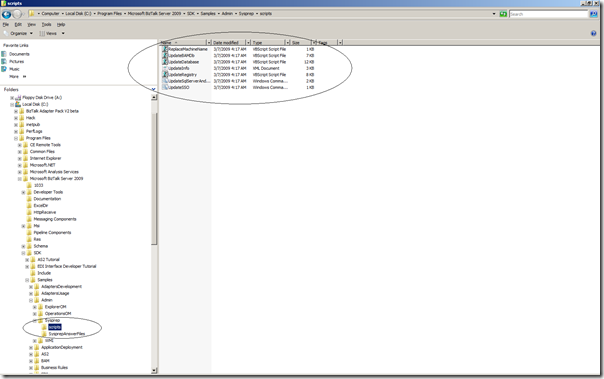
Last week I spotted a post stating that BizTalk 2009 SDK contains scripts so administrator’s will be able to sysprep a BizTalk Sandbox machine. In folder <BizTalk installation path>\SDK\Samples\Admin\Sysprep if you have chosen the SDK component during installation you can find the scripts.

image

An image created using sysprep will choose a new computer name in order to join the domain the first time it boots. To get BizTalk Server running properly, we need to update various instances of the machine name that are stored in registry and databases as well. This document from Microsoft assumes that BizTalk Server is configured to run on a single machine (Sandbox) and shows how to update those locations with the new machine name. With sysprep answer file that are included you can create your own. For instance if you are sys preparing a x86 machine like mine sandbox you can use script below:

<!--
References:
"Unattended Installation Settings Reference" @
http://technet.microsoft.com/en-us/library/cc749204.aspx

Make sure to modify any lines marked with a lone "!"

This file and the included scripts should be copied to the C:\scripts folder before running sysprep.

Run sysprep with the following options:

sysprep /generalize /oobe /shutdown /unattend:c:\scripts\unattend_Win2K8x86.xml
-->

<?xml version="1.0" encoding="utf-8"?>
<unattend xmlns="urn:schemas-microsoft-com:unattend">
    <settings pass="specialize">
        <component name="Microsoft-Windows-Shell-Setup" processorArchitecture="x86" publicKeyToken="31bf3856ad364e35" language="neutral" versionScope="nonSxS" xmlns:wcm="
http://schemas.microsoft.com/WMIConfig/2002/State" xmlns:xsi="http://www.w3.org/2001/XMLSchema-instance">
<!--
By specifying a value of "*" for <ComputerName>, Windows setup will generate a new computer name using a combination of <RegisteredOwner>, <RegisteredOrganization>, and random alpha-numeric characters.
-->
         <ComputerName>*</ComputerName>
!            <ProductKey>UPDATEME</ProductKey>
!            <RegisteredOrganization>UPDATEME</RegisteredOrganization>
            <DisableAutoDaylightTimeSet>false</DisableAutoDaylightTimeSet>
            <DoNotCleanTaskBar>true</DoNotCleanTaskBar>
!            <RegisteredOwner>UPDATEME</RegisteredOwner>
            <ShowWindowsLive>false</ShowWindowsLive>
            <StartPanelOff>false</StartPanelOff>
!            <TimeZone>Pacific Standard Time</TimeZone>
            <CopyProfile>true</CopyProfile>
            <Display>
                <ColorDepth>16</ColorDepth>
                <HorizontalResolution>1024</HorizontalResolution>
                <RefreshRate>60</RefreshRate>
                <VerticalResolution>768</VerticalResolution>
            </Display>
        </component>
        <component name="Microsoft-Windows-TerminalServices-LocalSessionManager" processorArchitecture="x86" publicKeyToken="31bf3856ad364e35" language="neutral" versionScope="nonSxS" xmlns:wcm="
http://schemas.microsoft.com/WMIConfig/2002/State" xmlns:xsi="http://www.w3.org/2001/XMLSchema-instance">
            <fDenyTSConnections>false</fDenyTSConnections>
        </component>
        <component name="Microsoft-Windows-Security-Licensing-SLC-UX" processorArchitecture="x86" publicKeyToken="31bf3856ad364e35" language="neutral" versionScope="nonSxS" xmlns:wcm="
http://schemas.microsoft.com/WMIConfig/2002/State" xmlns:xsi="http://www.w3.org/2001/XMLSchema-instance">
            <SkipAutoActivation>true</SkipAutoActivation>
        </component>
        <component name="Microsoft-Windows-IE-ESC" processorArchitecture="x86" publicKeyToken="31bf3856ad364e35" language="neutral" versionScope="nonSxS" xmlns:wcm="
http://schemas.microsoft.com/WMIConfig/2002/State" xmlns:xsi="http://www.w3.org/2001/XMLSchema-instance">
            <IEHardenAdmin>false</IEHardenAdmin>
            <IEHardenUser>false</IEHardenUser>
        </component>
<!--
Enter credentials for a user account that has permissions to join a computer to the domain specified in the <JoinDomain> element. (Note: you must enter your password in plaintext here. For better security, delete this file after the systems is restored.
-->
        <component name="Microsoft-Windows-UnattendedJoin" processorArchitecture="x86" publicKeyToken="31bf3856ad364e35" language="neutral" versionScope="nonSxS" xmlns:wcm="
http://schemas.microsoft.com/WMIConfig/2002/State" xmlns:xsi="http://www.w3.org/2001/XMLSchema-instance">
            <Identification>
                <Credentials>
!                    <Domain>UPDATEME</Domain>
!                    <Password>UPDATEME</Password>
!                    <Username>UPDATEME</Username>
                </Credentials>
!                <JoinDomain>UPDATEME</JoinDomain>
            </Identification>
        </component>
    </settings>
    <settings pass="oobeSystem">
        <component name="Microsoft-Windows-Shell-Setup" processorArchitecture="x86" publicKeyToken="31bf3856ad364e35" language="neutral" versionScope="nonSxS" xmlns:wcm="
http://schemas.microsoft.com/WMIConfig/2002/State" xmlns:xsi="http://www.w3.org/2001/XMLSchema-instance">
!            <RegisteredOrganization>UPDATEME</RegisteredOrganization>
!            <RegisteredOwner>UPDATEME</RegisteredOwner>
            <UserAccounts>
                <AdministratorPassword>
!                    <Value>UPDATEME</Value>
                    <PlainText>true</PlainText>
                </AdministratorPassword>
            </UserAccounts>
            <AutoLogon>
                <Password>
!                    <Value>UPDATEME</Value>
                    <PlainText>true</PlainText>
                </Password>
!                <Domain>UPDATEME</Domain>
                <Enabled>true</Enabled>
                <LogonCount>999</LogonCount>
!                <Username>UPDATEME</Username>
            </AutoLogon>
<!--
The following commands will be run the first time the image boots up after generalization.
-->
            <FirstLogonCommands>
                <SynchronousCommand wcm:action="add">
                    <CommandLine>cscript.exe slmgr.vbs -cpky</CommandLine>
                    <Order>1</Order>
                    <Description>Runonce1</Description>
                </SynchronousCommand>

                <SynchronousCommand wcm:action="add">
                    <CommandLine>cscript.exe c:\scripts\ReplaceMachineName.vbs c:\scripts\UpdateSqlServerAndInstanceName.cmd $(NEWCOMPUTERNAME)</CommandLine>
                    <Order>2</Order>
                    <Description>Replace computer name in UpdateSqlServerAndInstanceName.cmd</Description>
                </SynchronousCommand>

                <SynchronousCommand wcm:action="add">
                    <CommandLine>cscript.exe c:\scripts\ReplaceMachineName.vbs c:\scripts\UpdateInfo.xml $(NEWCOMPUTERNAME)</CommandLine>
                    <Order>3</Order>
                    <Description>Replace computer name in UpdateInfo.xml</Description>
                </SynchronousCommand>

                <SynchronousCommand wcm:action="add">
                    <CommandLine>cscript.exe c:\scripts\UpdateRegistry.vbs c:\scripts\UpdateInfo.xml > c:\scripts\UpdateRegistry.log</CommandLine>
                    <Order>4</Order>
                    <Description>Update biztalk registry settings</Description>
                </SynchronousCommand>

                <SynchronousCommand wcm:action="add">
                    <CommandLine>cscript.exe c:\scripts\UpdateDatabase.vbs c:\scripts\UpdateInfo.xml > c:\scripts\UpdateSqlServerDatabase.log</CommandLine>
                    <Order>5</Order>
                    <Description>Update biztalk databases</Description>
        </SynchronousCommand>

                <SynchronousCommand wcm:action="add">
                    <CommandLine>cscript.exe c:\scripts\UpdateBAMDb.vbs c:\scripts\UpdateInfo.xml > c:\scripts\UpdateBAMDb.log</CommandLine>
                    <Order>6</Order>
                    <Description>Update BAM databases</Description>
                </SynchronousCommand>

                <SynchronousCommand wcm:action="add">
                    <CommandLine>c:\scripts\UpdateSSO.cmd c:\scripts\UpdateInfo.xml > c:\scripts\SSO.log</CommandLine>
                    <Order>7</Order>
                    <Description>Correct SSO configuration</Description>
                </SynchronousCommand>

                <SynchronousCommand wcm:action="add">
!                    <CommandLine>c:\scripts\UpdateSqlServerAndInstanceName.cmd $(OLDCOMPUTERENAME) > c:\scripts\UpdateSqlServerAndInstanceName.log</CommandLine>
                    <Order>8</Order>
                    <Description>RenameSQL</Description>
                </SynchronousCommand>

                <SynchronousCommand wcm:action="add">
!                    <CommandLine>cscript.exe c:\scripts\ReplaceMachineName.vbs "%programfiles%\Microsoft BizTalk Server 2009\Tracking\bm.exe.config" $(OLDCOMPUTERENAME)</CommandLine>
                    <Order>9</Order>
                    <Description>Replace computer name in bm.exe.config</Description>
                </SynchronousCommand>
            </FirstLogonCommands>
            <OOBE>
                <HideEULAPage>true</HideEULAPage>
                <NetworkLocation>Work</NetworkLocation>
                <ProtectYourPC>3</ProtectYourPC>
            </OOBE>
!            <TimeZone>Pacific Standard Time</TimeZone>
        </component>
    </settings>
    <settings pass="generalize">
        <component name="Microsoft-Windows-Security-Licensing-SLC" processorArchitecture="x86" publicKeyToken="31bf3856ad364e35" language="neutral" versionScope="nonSxS" xmlns:wcm="
http://schemas.microsoft.com/WMIConfig/2002/State" xmlns:xsi="http://www.w3.org/2001/XMLSchema-instance">
            <SkipRearm>0</SkipRearm>
        </component>
        <component name="Microsoft-Windows-ServerManager-SvrMgrNc" processorArchitecture="x86" publicKeyToken="31bf3856ad364e35" language="neutral" versionScope="nonSxS" xmlns:wcm="
http://schemas.microsoft.com/WMIConfig/2002/State" xmlns:xsi="http://www.w3.org/2001/XMLSchema-instance">
            <DoNotOpenServerManagerAtLogon>true</DoNotOpenServerManagerAtLogon>
        </component>
        <component name="Microsoft-Windows-OutOfBoxExperience" processorArchitecture="x86" publicKeyToken="31bf3856ad364e35" language="neutral" versionScope="nonSxS" xmlns:wcm="
http://schemas.microsoft.com/WMIConfig/2002/State" xmlns:xsi="http://www.w3.org/2001/XMLSchema-instance">
            <DoNotOpenInitialConfigurationTasksAtLogon>true</DoNotOpenInitialConfigurationTasksAtLogon>
        </component>
    </settings>
    <cpi:offlineImage cpi:source="" xmlns:cpi="urn:schemas-microsoft-com:cpi" />
</unattend>

<!--
When the virtual machine is started, Windows Setup will:
- Assign the copy a random computer name
- Change the local Administrators password
- Join the domain specified in the sysprep.xml file (under Microsoft-Windows-UnattendedJoin\Identification\JoinDomain)
- Add the groups/users specified under <DomainAccounts> to the local Administrators and the local Remote Desktop Users group.
- Run the referenced scripts to restore BizTalk functionality
-->

Lines that need to be updated have a “!” before them. You can use these as a template, or make your own and copy the <FirstLogonCommands> section over. Rest is explained in the document online. All in all this will be very convenient for companies that are preparing themselves setting up an development team working with BizTalk Server 2009 to have multiple sandboxes.


Technorati:


Monday, May 11, 2009

BizTalk Server and UDDI 3.0

One of new SOA capabilities in BizTalk Server 2009 are UDDI services. I found an article at Packt Publishing written by Richard Seroter. UDDI stands for Universal Description and Discovery Information and is a type of registry whose primary purpose is to represent information about web services. As I was reading the article it gave me an itch to try this UDDI stuff out myself. So I opened my BizTalk 2009 Sandbox (VPC environment) and noticed UDDI was not installed. To let you know what to do I decided to create this post to show how UDDI is installed on a BizTalk 2009 Development Environment.

I fired up BizTalk Server 2009 CD and installed UDDI Services on my Sandbox.

UDDI 1

I selected all available components, and clicked install.

UDDI 2

UDDI 3

After only a minute or so UDDI services were installed.

UDDI 4

After installation UDDI Services Configuration is necessary; I choose basic configuration see what needs to be done. There are three components that need to be configured:

* UDDI Services Database Component
* UDDI Services Web Application
* UDDI Services Notification Service

UDDI 5

To enable UDDI Service you only need to click component and then check 'Enable UDDI Services Database Component'. You can then choose SQL Server Instance, Database File and Log Locations and Site Name. I left everything as is except I unchecked SSL for publication of this UDDI Services Site (It is a Sandbox, so SSL is not necessary in my view). Apply configuration and off you go.

 UDDI 6

UDDI 7

UDDI 8

Next component is Web Application. Double clicked component UDDI Services Web Application, checked 'Enable UDDI Services Web Application' and left everything as is except for Self-register this site's services in the UDDI registry and Active Directory, since I do not have and AD on my sandbox. Again apply configuration and of you go.

I then ran into a problem:

Could not load file or assembly 'Microsoft.Web.Administration, Version=7.0.0.0, Culture=neutral, PublicKeyToken=31bf3856ad364e35' or one of its dependencies. The system cannot find the file specified.

And solution to this is the following:

FileNotFoundException Occurs When Running ServiceModelReg.exe on Windows Vista
On Windows Vista, ServiceModelReg.exe may fail with the following message:
System.IO.FileNotFoundException: Could not load file or assembly 'Microsoft.Web.Administration, Version=7.0.0.0, Culture=neutral, PublicKeyToken=31bf3856ad364e35' or one of its dependencies. The system cannot find the file specified.

This is due to an incomplete installation of the Windows Activation Service (WAS). Ensure that all components of WAS are installed prior to running ServiceModelReg.exe. To do so, complete the following steps:

Open the "Turn Windows Features On or Off" dialog by clicking Start -> Control Panel -> Programs and clicking the "Turn Windows Features On or Off link."
In the tree view, select the "Windows Activation Service" checkbox.
Expand the "Windows Activation Service" checkbox and ensure the following sub-components are also selected:
- .NET Environment
- Configuration APIs
- Process Model
Click "OK" and wait for the components to finish installing.
Re-run ServiceModelReg.exe to register the WCF activation components with WAS.

These steps will install the minimal set of components required to support WCF service activation over non-HTTP protocols.

I noticed that Web Server Role was not added as a Server Role on my sandbox. I added Server Role on in my case Window 2008 Server (which is an incomplete installation of WAS). I then open commandbox and performed following command:

C:\Windows\Microsoft.NET\Framework\v3.0\Windows Communication Foundation\ServiceModelReg -i.

(see screens below)

UDDI 10 

UDDI 11

Do not forget if component failed to configure to close UDDI Services Configuration and open it up again.

UDDI 9

UDDI 12

Last but not least is UDDI Services Notification. Double click this component and check 'Enable UDDI Notification Sercive'. Notice that SMTP Server is needed. In my case another Server Role. I added STMP Server and could then fill in SMTP Server and a bogus email address. I choose Anonymous authentication for convenience and applied configuration. This last step of configuration went successful.

UDDI 13

UDDI 14

UDDI 15

UDDI 16

UDDI 17

UDDI 18

To check if things are up and running I fired UDDI Services Management Console up and noticed both UDDI components (Web and Notification) were running.

image

Now I am able to check out UDDI as described in article by Richard. If you are in a situation where you want to install UDDI on a machine with BizTalk or other machine hopefully this post will give you some guidance of insight.


Technorati:


WCF 4.0

Spring holiday is over and it is back to work. There is a new challenge awaiting for me involving IBM Maximo, WCF, MSMQ and BizTalk. Speaking of WCF there are changes and I see some postings about WCF 4.0. At PDC last year there were some talks around WCF 4.0. The discussions completely by-passed me, but I have a new chance to get up to speed. End of May DevDays 2009 will take place and I am  able to attend. Some sessions from for instance Aaron Skonnard are about WCF 4.0. Also I will attend preconference session of a complete day called “Introduction to WCF and WF 4.0 and "Dublin"” by Matt Milner. Since WCF as technology plays an essential role inside BizTalk Platform it is mandatory in my view to have experience, knowledge and understanding of it.


Technorati: