Posts

Showing posts with the label BizTalk 2006 R2

White Paper: Supportability and operations of Microsoft BizTalk Server

My first white paper on BizTalk Server has been published. The title is Supportability and operations of BizTalk Server and it can be downloaded through this link . The white paper will discuss supportability of BizTalk Server. Something you should be thinking of when setting up a BizTalk environment or when your current environment lacks or needs improvement in that aspect. Thinking about supportability of BizTalk from the very beginning should be one of the best practices that organizations need to implement. Because the team responsible for supporting the BizTalk Server environment is not involved at the beginning, during the deployment of the environment or are pulled into a project at the very end, in many projects the supportability is overlooked or not part of the initial project plan. This will lead to increasing costs of supporting the BizTalk environment as the administrators are ill prepared, poorly trained or may lack the necessary skills, and even worse given a poorly ...

Monitoring BizTalk Solutions – The Tools Part 1

Image
In one of my previous post I talked a little bit about monitoring BizTalk solutions in the enterprise. I now want to delve into some of the offerings around monitoring BizTalk Solutions. I like to discuss three available tools available today, at least I will delve into each one in separate: · BizMon Tool ; · FRENDS Helium ; · Minotaur . I will start with BizMon Tool made by Richard Hallgren. To set it up I downloaded the tool after filling out a form. I deploy this tool on one of my VPC’s and in this case a fresh one with BizTalk 2009, SQL Server 2008, VS 2008 SP1, SQL Server 2008. BizMon supports installation on either directly on BizTalk machine or on a stand-alone server without previous BizTalk installation. It will require some basic Windows component as well as some BizTalk administration components. System requirements Windows 2003 or Windows 2008 IIS 6 or IIS 7 .NET Framework 3.5 When installing on a standalone-server you need to install the follo...

Microsoft BizTalk Server Futures and Roadmap

Image
Want to hear how your development skills with Windows Communication Foundation (WCF), and Windows Workflow Foundation (WF) work seamlessly with the powerful integration platform of BizTalk. Do want to find out how BizTalk aligns with the Microsoft application server in the longer term. Look at this presentation from PDC09. Technorati: BizTalk BizTalk 2006 R2 BizTalk Server 2009 PDC09

BizTalk at PDC 2009

Image
Latest update on PDC09 regarding BizTalk are being posted last wednesday by BizTalk Server Team. I mentioned some sessions a while ago . Team blog post will tell you what session, where and by who will be given coming week at PDC09. I am will virtually attending through channel 9 at home. Technorati: BizTalk BizTalk 2006 R2 BizTalk Server 2009 PDC09

PDC2009 BizTalk Sever Sessions

Image
Last BTUG question was asked who will be going to PDC 09 this year. No one raised his hand compared to a lot of hands last year even though no BizTalk session was given. It will be the other way around this year; hence almost no one unfortunately is going there are BizTalk sessions planned this year. I am still secretly hoping I can go, but chances are slim. What session about BizTalk are planned this year at PDC09 Queuing and Publish/Subscribe in a Heterogeneous Environment by David Ingham , John O’Hara Queuing and publish/subscribe are common patterns for building loosely-coupled, distributed applications. Learn how to use Microsoft Windows Communication Foundation (WCF) the new Microsoft ASP.NET 4.0 routing service, the Microsoft .NET Service Bus, and Microsoft BizTalk Server to easily connect heterogeneous systems. We’ll then introduce AMQP (the Advanced Message Queuing Protocol), an important new open standard for interoperable message-oriented middleware, which will reduce t...

BizTalk Server 2006 R2 SP1 Beta

Image
If you working with BizTalk Server 2006 R2 and there are a lot of installation (instances) globally a new SP1 is coming out soon. Beta SP1 for BizTalk Server 2006 R2 has been released today. This service pack is an update for BizTalk Server 2006 R2.  It includes fixes to issues that have been reported through customer feedback platforms towards Microsoft, as well as within Microsoft discovered issues. To get hold of the beta you need to go here . A guide for this service pack is also available on the download page.  Technorati: BizTalk 2006 R2 BizTalk Server 2006 R2

Monitoring BizTalk Solutions in an Enterprise

Image
There are certain aspects (governance, support groups) that need to be understood when monitoring BizTalk solutions starts become necessary. One aspect is support groups with roles and responsibilities. I summarize here what in my opinion and experience these groups should be and which roles are mandatory: Technical supports needs to monitor Operating System and SQL Server: System administrator (support, monitor health of system); Database administrator (support, monitor health of database). Functional support to monitor messaging, orchestrations, ports: BizTalk Support (Interface Specialist, Process Specialist); BizTalk Operator (support deployment BizTalk applications, configuration); BizTalk Developer (BizTalk Application Specialist). Business level support to monitor activity, throughput: Business Analyst (monitor activity/processes, analyze trends); Business Support Manager (monitor activ...

BizTalk and SharePoint Services a good couple

Image
About two years ago a walkthrough article was written by Arnulfo Wing about using BizTalk Server 2006 with Windows SharePoint Services 3.0. And more were written from that time on and maybe even before. It shows that integration with SharePoint is very feasible and natural, being both Microsoft products with .NET technology. Some examples you can use as background or material to experiment with WSS 3.0 and BizTalk are: Collaborating with the BizTalk 2006 R2 SharePoint Adapter ; Windows SharePoint Services Support in BizTalk Server ; Windows SharePoint Services 3.0 Tools: Visual Studio 2005 Extensions User Guide, Version 1.1 ; Windows SharePoint Services 3.0 Tools: Visual Studio 2008 Extensions, Version 1.2 ; Visual Studio 2008 extensions for Windows SharePoint Services 3.0, v1.3 - Mar 2009 CTP ; BizTalk 2009 + SharePoint/WSS 3.0 integration first look ; BizTalk + SharePoint: 1+1=3 ; Last one a whitepaper was written by my colleagues Wesley and Gijsbert...

BizTalk Configuration Manager

Image
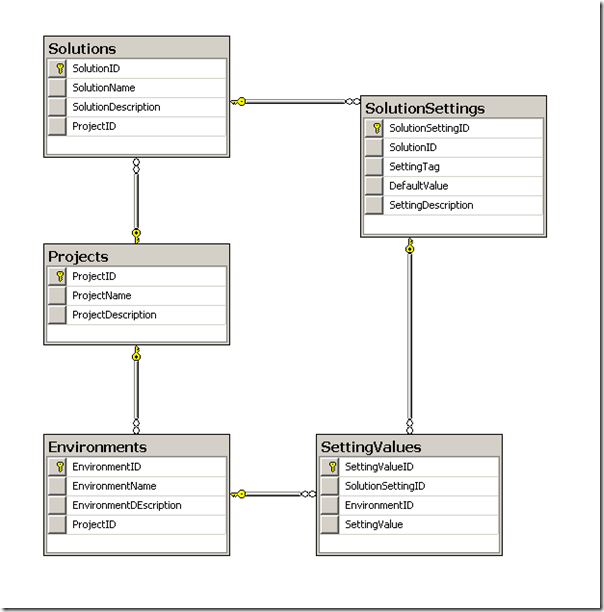
Michael Stephenson has released a new version of configuration manager for BizTalk. I myself was not familiar yet with this tool. I downloaded it from CodePlex and tried it out on one of virtual machines. To use the tool there is a video out that explains the tool. Tool itself is used to help you manage the different settings needed for binding and configuration files across different environments and allows you to connect this with your build process. Once you have downloaded the tool in zip file, you need to unzip it. There is a compiled help file that will tell you about the tool, how to set it up and install it, walkthroughs and utilities. I did a quick and simple install, setting up the database and application. In VPC I used was BizTalk 2006 R2 environment with VS2005 and SQL2005. Setting up database will result in following database schema   Application will need its connection string set to database (ConfigurationManagement) on your server. I added the test data an...

BizTalk Adapter Pack 1.0 on x64 Considerations

Image
Last week I posted an issue around BizTalk Adapter Pack 1.0 in x64 environment. Now I like to clarify a couple of things concerning installation BizTalk Adapter Pack 1.0 in x64 environment and running the adapter in x64 host instance. One thing to consider is having an Oracle specialist around and someone with access to meta-link, because for x64 environment you will need patch 5337014 and 6344569, latter being a OPatch. For 64-bit according to installation guide a Oracle 10.2.0.3 64-bit client is required, which supposed to be a part of one of the mentioned patches. This is how I interpreted, but this is not the case. The patches do not contain a 64-bit Oracle client. You will need to download and install 102010 win64 x64 client first and then install ODAC and apply patch 5337014 and oPatch 6344569 in same directory as ODAC. Applying patch 5337014 is pretty straight forward, but oPatch something different. First you will to need to copy patch in oPatch directory of 64-bit client a...

BizTalk Adapter Pack 1.0 Issues

Image
You can run into some trouble installing BizTalk Adapter Pack 1.0. I stumble upon the following: 1: Messaging Engine The Messaging Engine failed to add a receive location " MyReceiveLocation " with URL " oracledb://xxxx " to the adapter "WCF-Custom". Reason: "Microsoft.BizTalk.Adapter.Wcf.Converters.CreateBindingException: Unable to get binding type for binding extension "oracleDBBinding". Verify the binding extension is registered in machine.config.    at Microsoft.BizTalk.Adapter.Wcf.Converters.BindingFactory.GetBindingType(String bindingName, Type& bindingElementType)    at Microsoft.BizTalk.Adapter.Wcf.Converters.BindingFactory.CreateUserBinding(String bindingName, String bindingConfiguration)    at Microsoft.BizTalk.Adapter.Wcf.Converters.BindingFactory.CreateBinding(String bindingName, String bindingConfiguration, String bindings)    at Microsoft.BizTalk.Adapter.Wcf.Config.C...

Installation of SSO on SQL Cluster

Image
In this post I will tell a story of my experience with installation of SSO on SQL Cluster. Each BizTalk Server has an Enterprise Single Sign-On service (EntSSO.exe). Enterprise Single Sign-On is also referred as SSO or EntSSO. SSO serves two purposes. One is for data encryption, that is, port URI data. And the other is, as what the name indicates, Single Sign-On. Single Sign-On is about credential mapping. BizTalk Server SSO currently supports only Windows-initiated Single Sign-On. That means you can only map Windows users accounts to external application (affiliate application) user accounts. On the inbound side the sender is authenticated with Windows; on the outbound side, BizTalk Server automatically authenticates with the affiliate applications using the preconfigured credential mapping. Single Sign-On is a useful feature in business-to-business (B2B) scenarios. Note: However the encryption function is mandatory for a BizTalk system. Single Sign-On for credential mapping can be...